
Friday, 2 p.m. A customer’s truck unloads ten pallets of raw material. By Wednesday you have sorted, packed and palletized it, and seven pallets of finished product are ready to ship. Then the customer calls: how much exactly came out of our lot, and what are we paying for? If the answer lives in three spreadsheets and the memory of one shift leader, you need ERP for toll manufacturing, even if the ERP you have today was built for a very different kind of factory.
Why a standard ERP struggles with toll manufacturing
In toll manufacturing, also called contract processing, you process material that belongs to your customer and charge a fee for the service. A standard manufacturing ERP assumes the opposite: you buy materials, make a product, own it and sell it. Stock is yours, cost is yours and revenue is a sale.
When most of the goods on your floor belong to someone else, those assumptions break in small, expensive ways. The wrong customer’s lot gets issued. The invoice is based on a norm instead of what was produced. Nobody can say quickly whose pallet is whose. Many plants also run their own production next to toll work, in the same warehouse and on the same lines, which makes the problem harder, not easier.
Here are five things the system has to do well. You can check each of them in a demo.
1. Keep the owner on every lot
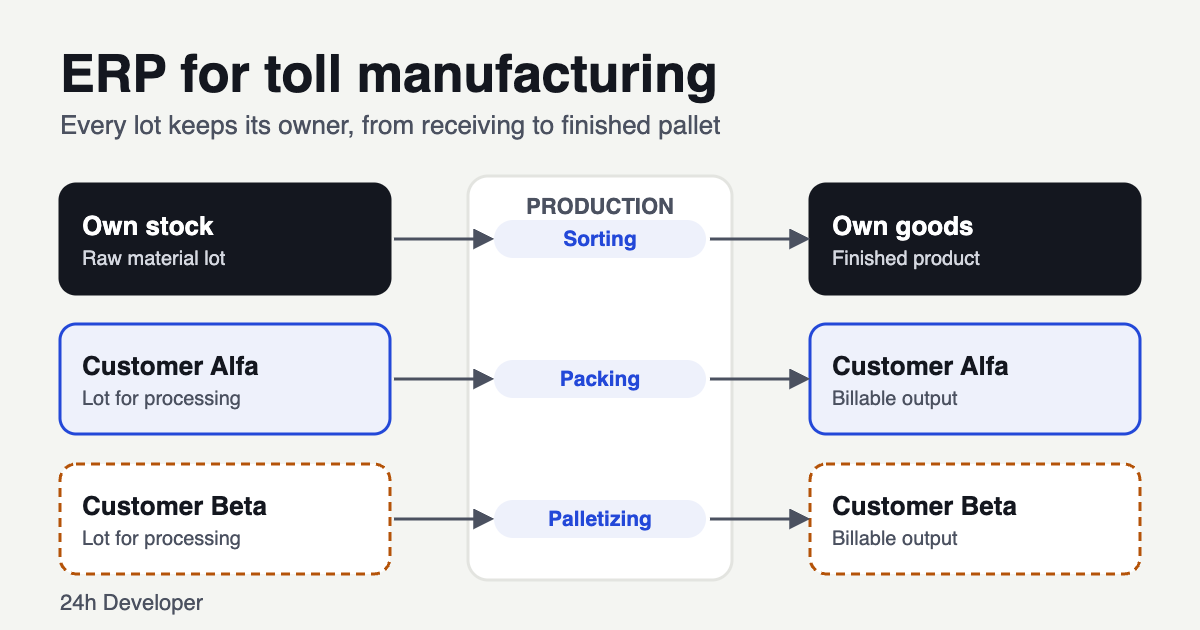
Every lot should carry its owner from the moment it is received until it is shipped or returned. That owner has to survive every step in between: issue to production, consumption, intermediate outputs, finished goods and unused material coming back from the line. If ownership is a note in a comment field, it will be lost the first time a lot is split.
A simple test is to ask for stock by owner in one warehouse on a given date, and to ask how that number is calculated. The best answer is that stock is simply the sum of movements, so every figure can be traced back to documents.
2. Record the real yield, not the norm
In processing, output varies from lot to lot. Fruit differs by season, grain by moisture, regrind by batch. A fixed norm per kilogram is a guess, and billing from a guess invites disputes. The system should let the operator enter the quantity that actually came out of each lot and keep the norm for planning only.
This is why process manufacturers are better served by a bill of materials that accepts actual yield than by one that computes consumption from a fixed recipe. For products with a stable norm you still want the second kind, so look for a system that supports both.
3. Model the route, not only the recipe
A recipe says what goes in and what comes out. A route says what happens in between: sorting, packing, palletizing, on which machine, in what order, and what has to finish before the next step can start. With a route, a production order turns into work orders, each with its own status, time and output.
That structure answers the questions you get on a busy day. Where is the customer’s lot right now? Which step is waiting for inspection? How many hours did packing really take? It also makes rework and replacement manageable, because a rejected batch becomes its own work order instead of an edit to history.
4. Bill from what was actually produced
The invoice for a toll customer is built from final, accepted output, measured in kilograms, pieces or pallets. Intermediate products, such as goods that are sorted but not yet packed, should never reach an invoice. Partial pallets need a sensible rule, and a system that handles a quarter of a pallet as naturally as a whole one saves a lot of arguments.
Good ERP for toll manufacturing also remembers what has already been billed, so that a correction a week later does not produce a second invoice for the same goods.
5. Warn, but do not stop the line
On the shop floor, a missing document must not stop a shift. A system that blocks work because a lot is not yet booked in will be bypassed by lunchtime, and then its data is worthless. It is better to raise a warning, let the work continue and have the office fix the paperwork afterwards, with the warning still visible until it is fixed.
What to leave in your accounting software
An ERP for a processing plant does not have to replace your books. Invoices, the ledger and taxes can stay where they are. What the production system has to deliver is a clean list of billable quantities per customer and period, which your accounting software can turn into invoices.
A short checklist before you choose
- Can it show stock by owner and trace every number to documents?
- Does it accept actual yield per lot?
- Can it model a route with machines, steps and dependencies?
- Does it bill from final, accepted output, including fractional pallets?
- Does it warn instead of blocking work on the floor?
- Can it hand billable quantities to your accounting system?
If a vendor cannot show at least four of these on your own data, keep looking.
Where to start
Take one real order from last month: the lot that arrived, the steps it went through, what came out and what you billed. Write it on one page. That page is the best requirement document you can have, and the quickest way to compare systems.
If you would like to see how this looks in practice, read about our ERP for manufacturing and processing companies, or tell us how your plant works. With a sample order we can show you your own flow in a working prototype.
