
Monday, 9:00. A regular customer emails asking for a price on forty items. You open the price list, but there are three versions of it. One has last month’s discounts, one lives on your colleague’s laptop, and the third is the file you sent this customer last time. By the time the offer goes out, it is the afternoon, and you are still not sure the stock numbers are right.
If this sounds familiar, you probably need a B2B distributor ordering system, even if you would never call it that. For a small distributor, the offer-to-order cycle is the heart of the business, and it is exactly where Excel starts to hurt.
Why Excel works for a while, and then does not
Excel is a good starting tool. It is flexible, everyone knows it, and it costs nothing extra. For a distributor with a handful of customers it does the job.
The trouble starts when the same information lives in many files. Prices are copied between workbooks. Offers are saved under names like “offer_final_v3”. Orders arrive by email, phone and messenger, and someone retypes them. Every copy is a chance for an error, and no one can answer a simple question quickly: what did we promise this customer, and what did we actually ship?
If you want a broader checklist, we described the warning signs in When Excel Stops Being Enough. For a distributor, the most telling sign is time: when preparing an offer takes longer than the customer’s patience.
Start with the flow, not the software
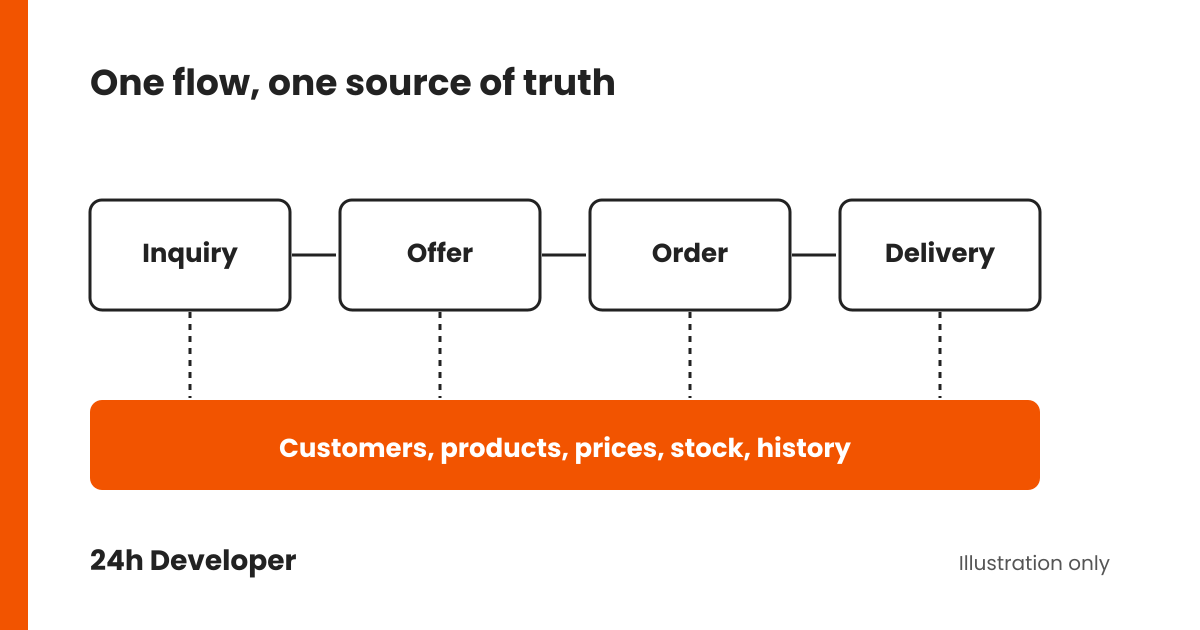
Before anyone builds anything, draw the path a typical deal takes: inquiry, offer, order, delivery, invoice. Then mark where information is retyped or where it waits for a person. Those are the places the system should remove first.
In our experience, small companies often try to automate everything at once. It is better to pick the one flow that costs the most time, usually offers and orders, and make that work well. Everything else can follow.
What a B2B distributor ordering system really needs to do
A useful system for a small distributor is smaller than most people expect. The core is usually:
- One customer list with contact details, agreed discounts and order history.
- One product list with prices, units and current stock.
- An offer builder that pulls prices and customer conditions automatically, so the offer is ready in minutes.
- A one-click conversion from an accepted offer to an order, with no retyping.
- A simple status for each order, so anyone can answer “where is it?” without calling a colleague.
Notice what is not on the list: complicated reports, dozens of integrations, a perfect warehouse module. Those can come later, if they turn out to matter.
Moving your data without chaos
The data you already have in Excel is an asset, but it is rarely clean. Expect duplicate customers, products with three spellings and prices with no date. Spend a little time on cleaning before the move, and decide who owns each list afterwards.
Do not try to import ten years of history on day one. Start with active customers, current products and open orders. Older records can be added or archived later. And keep the old files for a short, defined period, as a safety net, but stop updating them. Two live sources of truth are worse than one imperfect one.
If you want to see how a rollout like this unfolds in practice, we walked through it in How an Order Management System Rollout Works, Step by Step.
Test with real work before you decide
The best test of a system is not a demo; it is a week of real offers and orders. Give it to the people who will use it every day and let them tell you what is slow, what is missing and what is confusing. Their feedback matters more than any feature list.
This is why we work with a short working prototype first. You can read how it is possible in The 24-Hour Prototype. A prototype built around your own customers, products and offer format lets you judge the idea on facts, not promises, before you commit to anything larger.
Where to begin
You do not need a project plan to start. Take one typical offer from your last month, follow it from the inquiry to the delivery, and write down every place where someone typed the same thing twice. That list is the first draft of your requirements.
If you would like to talk it through, describe your process to us. We can look at where the time goes, and in about 24 hours you can have a working prototype to try with your own data.
