

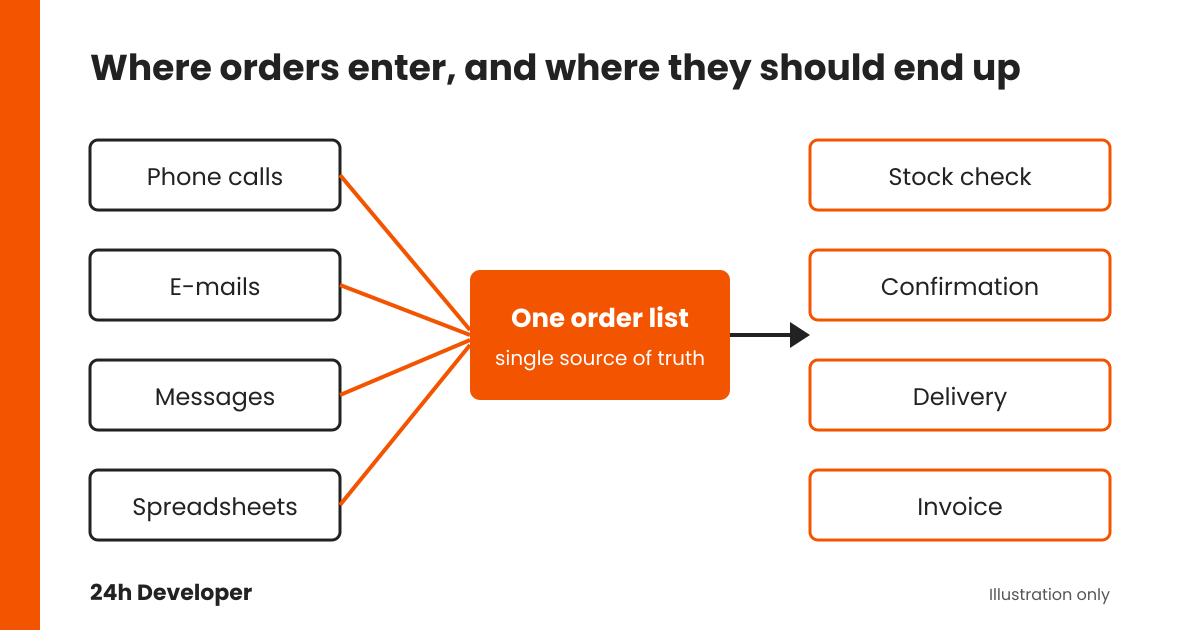
Orders arrive by phone, by e-mail and in a message at seven in the morning. Someone copies them into a spreadsheet, someone else checks the stock, and by Thursday nobody is sure which version of the file is the right one. If this sounds familiar, you are probably considering an order management system, and wondering what introducing one would actually involve.
The honest answer is that it is far less dramatic than most owners fear, as long as the steps come in the right order. Here is how a rollout looks from the practitioner’s side, based on three decades of watching these projects succeed and fail.
Step 1: Map how an order really travels
Before anything is built, sit with the people who handle orders and follow one order from the first contact to the paid invoice. Not the process as written in a manual, but the one that happens on a busy Tuesday. Where does the order arrive? Who retypes it? Who checks availability, and how? Where does it wait?
You will usually discover two or three informal rules that live only in someone’s head, such as “this customer always gets a discount” or “never promise that item before the 15th”. These rules are exactly what a system must capture, and exactly what a generic product tends to miss.
Step 2: Decide what your order management system must do first
The most common reason for failed rollouts is an ambitious first version. Resist it. Choose the smallest set of functions that removes the most daily pain, and leave the rest for later. For many small distributors that set looks like this:
- one list of all orders, whatever channel they came from
- a stock check at the moment an order is entered
- a confirmation or quote the customer receives in a consistent form
- a clear status for every order: new, confirmed, shipped, invoiced
Reports, integrations with the accounting package and customer portals can wait. A system that does four things reliably beats one that does fourteen things approximately.
Step 3: Build a prototype and let people use it
Screens on paper and slide decks do not tell you whether a system fits the work. A working prototype does, because the person who enters orders every day will find in ten minutes what a meeting would miss in ten hours. This is the reason we build a first working version quickly and put it in front of users, as described in how a 24-hour prototype works and what you get from it.
Then comes a testing period with real, or realistic, orders. Expect a list of changes. That list is not a sign of failure; it is the whole point of testing before you commit.
Step 4: Move your data and run both worlds side by side
Your customers, products and price lists probably live in spreadsheets. Moving them is less about technology than about cleaning: duplicate customers, products named three different ways, prices nobody remembers setting. Plan a little time for this, because the system is only as good as the data it starts with.
For a short period, run the old way and the new one in parallel. It feels like double work, but it gives the team a safety net and gives you a direct comparison. If you are still deciding whether you have outgrown spreadsheets, five signs that Excel is no longer enough is a good checklist, and the comparison of a CRM and a custom application helps when you are choosing the type of solution.
Step 5: Train the people who touch orders every day
Training does not need to be long, but it must be done with the actual users, on their own examples. Name one person in the company as the owner of the system, someone who knows the rules and can answer questions on day two, when the first real doubts appear. Without that person, small questions turn into workarounds, and workarounds turn into a second spreadsheet.
How long does it take?
It depends mostly on the clarity of the process, not on the amount of code. A company with a well understood order flow and a modest first scope moves quickly. A company where every customer is handled differently needs more time at the mapping stage, and that time is well spent. The slowest projects we have seen were slow because nobody could decide what the rules were, not because the software was hard to write.
A sensible rhythm is a working prototype first, a period of testing, and only then a decision about the full rollout. That way the commitment grows together with your confidence.
If orders in your company still travel through phone calls, inboxes and spreadsheets, a short conversation about your process is a good place to start. We can then prepare a working prototype within 24 hours, so you can judge it on your own orders instead of on promises.
